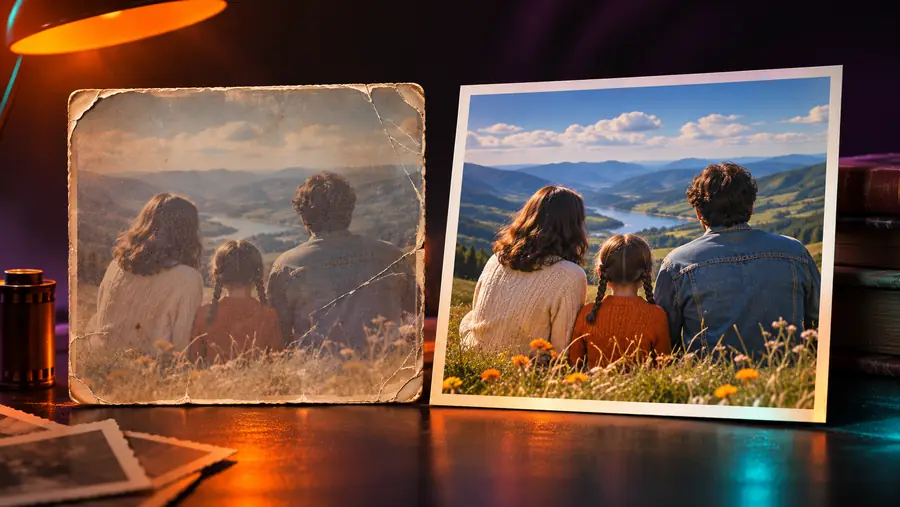
What is ai enhancer app software that uses trained image models to improve visual clarity, detail, lighting, or sharpness with less manual retouching. It supports editing decisions, but it does not replace judgment about the original image.
The result depends on the source image, the model's interpretation, and the type of correction requested. These tools are useful, but their limits matter.
It cannot recover every lost detail
Severe blur, heavy compression, or tiny source images may not contain enough information for a faithful reconstruction.
Workaround
Use the highest-quality original available and treat newly generated detail as an approximation.
It cannot guarantee a perfect identity match
Faces, text, fine patterns, and distinctive objects can be interpreted incorrectly when the input is damaged or unclear.
Workaround
Review important areas at full size before publishing or sharing the result.
It cannot replace creative editing
Enhancement can improve clarity and balance, but it does not automatically decide the best crop, composition, message, or visual style.
Workaround
Use a photo editor afterward when the image needs deliberate design changes.
It cannot make every image look natural
Strong sharpening, contrast, or color correction can produce halos, plastic-looking skin, or exaggerated edges.
Workaround
Prefer subtle adjustments and compare the output with the original before keeping it.
The basic process
What it can and cannot do
Most enhancement workflows follow the same three-part pattern: inspect the source, apply a focused correction, and review the result against the original.
1
Add the source image
Choose a clear copy of the photo or graphic you want to improve. The original gives the model more useful visual information to interpret.
2
Analyze and enhance
The app identifies visible issues such as softness, noise, uneven light, or muted color, then applies adjustments suited to the image.
3
Check the finished result
Compare the enhanced version with the source and keep the result only if the added clarity supports the image's purpose.
A practical example
See the difference in an enhanced photo
A before-and-after comparison is the clearest way to judge whether added detail improves the image without making it look artificial.
Original image
Enhanced image
Compare detail, edges, and skin texture rather than brightness alone.
Choose the right tool
AI enhancer app versus manual editing
An enhancer and a traditional editor solve related but different problems. The better choice depends on whether you need automatic correction or precise creative control.
AI enhancer app
Manual photo editor
Primary purpose
AI enhancer app
Improve visible quality with automated corrections
Manual photo editor
Change, arrange, and refine image elements by hand
Starting skill
AI enhancer app
Useful with limited editing experience
Manual photo editor
Usually requires familiarity with editing controls
Speed
AI enhancer app
Applies a focused pass in a short workflow
Manual photo editor
Can take longer when several settings need adjustment
Creative control
AI enhancer app
Limited to the tool's available enhancement behavior
Manual photo editor
Detailed control over layers, masks, crops, and effects
Best input
AI enhancer app
A photo that is usable but soft, noisy, dark, or low in detail
Manual photo editor
An image needing composition or design changes
Review required
AI enhancer app
Check faces, text, edges, and unusual textures
Manual photo editor
Check the same areas while adjusting them directly
Common users
Who uses an AI enhancer?
Different people use enhancement for different reasons, from making a personal photo easier to view to preparing a clearer image for a project.
Family archivists
They have scanned or photographed older family pictures with faded contrast, softness, or visible grain.
A careful enhancement can make the image easier to inspect while preserving the character of the original.
Now that you know what an AI enhancer can and cannot do, start with one image and inspect the result closely. A focused enhancement pass is most useful when it supports the original photo instead of trying to reinvent it.
An AI enhancer app analyzes an image and applies automated changes intended to improve qualities such as sharpness, clarity, lighting, color, or visible detail. It is designed to reduce repetitive correction work, not to make every image perfect.
No. An enhancer focuses mainly on improving the existing image, while a photo editor usually provides broader control over cropping, layers, masks, composition, and creative effects. Many workflows use enhancement first and manual editing afterward.
It can sometimes make a mildly soft photo look clearer by improving edges and local contrast. It cannot reliably recover information that was never captured, so severe motion blur, extreme compression, or a very small source may still look imperfect.
It can help anyone who wants a quicker way to improve an everyday photo, scanned picture, product image, or project asset. It is especially useful when the image is broadly usable but needs more clarity before sharing or editing.
Yes. Keep the original so you can compare the result, retry with a different approach, or return to the untouched source later. Reviewing both versions also helps you spot artificial detail, halos, or changes to important features.